How Much JS Does an Ordering Widget Cost? Measure It Yourself
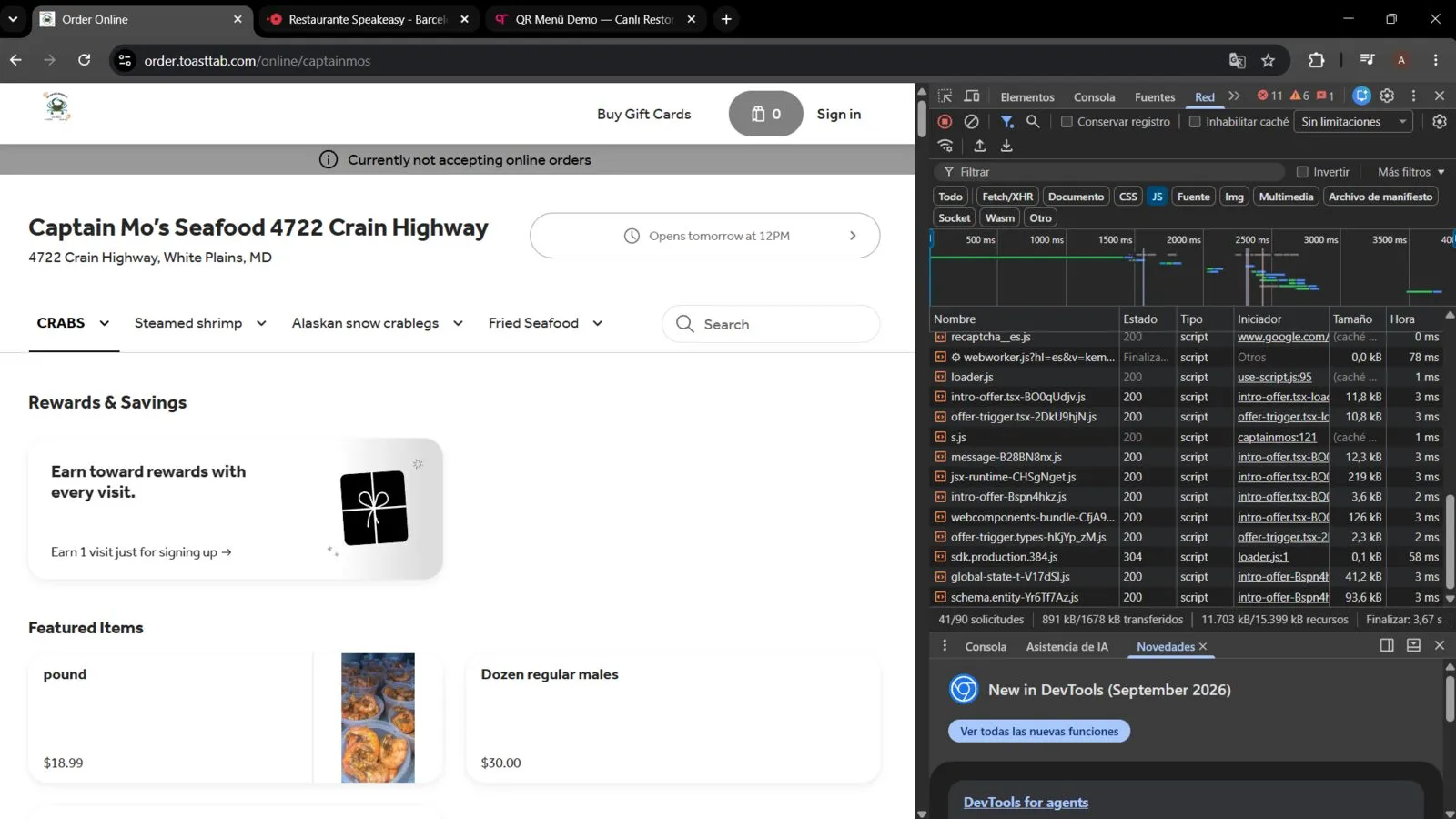
There is no trustworthy published figure for “how much JavaScript does an online ordering widget add to your site” — and anyone who gives you a single number without naming the exact widget, the exact page, and the exact measurement method is guessing, not reporting.
Why a Generic Number Doesn’t Exist
Third-party ordering platforms don’t publish their script weight, and the closest thing to independent industry data — HTTP Archive’s Web Almanac, which tracks how much JavaScript third-party embeds add to the average page — groups third parties into broad categories like ads, analytics, social, and tag managers. It does not break out restaurant ordering widgets as their own category, so any claim citing “the industry average” for this specific thing is not coming from that source, or any other source that actually measured it.
That leaves one honest option: measure the specific widget you’re considering, on the specific page it’ll load on, yourself. It’s a five-minute check, and it’s more reliable than any benchmark someone else could hand you.
What Gets in the Way, in Practice
Trying to do this measurement runs into two real problems worth knowing about before you start:
- Bot-detection can block the page entirely. Some ordering platforms’ checkout and menu pages sit behind a bot-challenge (Cloudflare’s “Attention Required” screen is a common one), which triggers for automated tools and sometimes for a fresh incognito session too. If you hit this, it’s not a sign you’re doing anything wrong — it means that particular page isn’t measurable this way, and the vendor’s own sales team is the only path to a real number for it.
- Loading the vendor’s full marketing site instead of the actual widget inflates the count massively. A vendor’s homepage carries its own analytics, chat widget, marketing pixels, and full navigation — none of which travels with you when you embed their ordering widget on your own page. Measuring the wrong page gives you a number many times too large, and it’s an easy mistake to make since the “widget demo” is often just a page on the vendor’s main site.
The Method That Actually Works
- Open an incognito window — this avoids extensions and cached scripts skewing the count.
- Go to the specific page where the widget is actually embedded — either your own site’s staging page with the widget installed, or the vendor’s dedicated widget-embed demo (not their homepage).
- Open DevTools (
F12orCtrl+Shift+I/Cmd+Option+I) and click the Network tab. - Click the JS filter chip at the top of the Network panel — click it, don’t type “js” into the text search box, which matches on URL text rather than actual file type and gives an unreliable count.
- Reload the page (
Ctrl+R/Cmd+R). - Read the “transferred” figure in the summary bar at the bottom — that’s the real, gzip-compressed size a visitor’s browser downloads. Ignore “resources,” which is the uncompressed size and isn’t what affects load time.
What To Actually Compare
Run this same check against your top two or three candidate providers’ own widget-embed pages, using identical steps each time. That apples-to-apples comparison, on your actual shortlist, is worth more than any published ranking — because it’s the exact code that would load on your site, not a vendor’s marketing claim about it. Pair it with the real cost figures in how much does commission-free online ordering actually cost? and the integration questions in how to embed an online ordering widget without losing conversion attribution before you commit to one.